Procreate Brush Stamp Simple Kids a-Z: A Practical Toolkit for Digital Creators
If you have ever tried to hand-letter an alphabet in Procreate, you know it is rarely as quick or consistent as you hope. Even experienced illustrators can struggle with maintaining uniform spacing and style when creating educational materials, children’s books, or playful social media graphics. This is where the Procreate Brush Stamp Simple Kids a-Z set becomes an invaluable asset. It is not just a collection of letters; it is a time-saving solution designed specifically for the iPad creative workflow.
This resource provides a streamlined way to incorporate clean, child-friendly typography into your digital projects without the steep learning curve of vector design software. By understanding exactly what is included and how these brushes function within the Procreate ecosystem, you can significantly speed up your production process while maintaining a high level of aesthetic quality.
What Is Inside the Package?
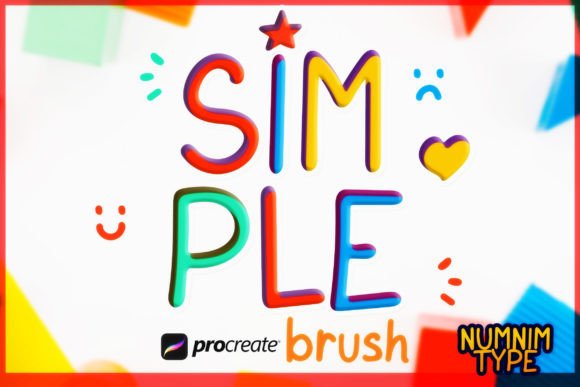
Before diving into use cases, it is important to understand the specific components of this tool. The download comes as a single zipped file containing a dedicated Procreate brush set. Unlike standard text tools that require font installation and layer manipulation, these are stamp brushes. This means each character is treated as a distinct image stamp, allowing for immediate placement and customization using Procreate’s native color and transformation tools.
The set includes:
- 26 Alphabet Brush Stamps (Style 1): A complete A-Z set with a specific hand-drawn aesthetic.
- 26 Alphabet Brush Stamps (Style 2): A second variation of the A-Z set, offering a slightly different visual tone for variety.
- Number Stamps (0-9): One style of numeric characters, essential for dates, prices, or counting exercises.
It is worth noting that if you need editable vector paths or traditional font files for print layouts outside of Procreate, the creator offers separate Font and SVG versions at the Numnim Type Store. However, for anyone working strictly within the iPad environment, these brush stamps are optimized for speed and ease of use.
Real-World Applications for Educators and Parents
One of the most immediate benefits of the Procreate Brush Stamp Simple Kids a-Z is its utility in education. Teachers and homeschooling parents often create custom worksheets, flashcards, and visual aids. Standard computer fonts can feel sterile or disconnected from the warm, approachable vibe needed for early childhood education.
With these brush stamps, you can quickly assemble phonics charts or name tags. For example, a preschool teacher might use Style 1 to create a "Letter of the Week" poster. Because the brushes are stamps, you can easily rotate individual letters to add a playful, dynamic feel that rigid text boxes cannot achieve. You can also change colors instantly to highlight vowels versus consonants, making abstract grammatical concepts visually tangible for young learners.
Parents can also use these tools to create personalized reward charts. Instead of printing generic templates, you can design a unique chart featuring your child’s name using the friendly letterforms, adding a personal touch that motivates engagement.
Streamlining Content Creation for Social Media
For bloggers, influencers, and small business owners, consistency is key to brand recognition. However, creating fresh graphics daily is exhausting. The Procreate Brush Stamp Simple Kids a-Z allows content creators to produce engaging visuals rapidly. Imagine you run a parenting blog or a craft shop. You need to announce a sale or share a quick tip.
Using the number stamps alongside the alphabet, you can create eye-catching thumbnails for Instagram Stories or Pinterest pins. The hand-drawn quality feels authentic and approachable, which resonates well with audiences tired of overly polished corporate aesthetics. You can layer these stamps over photos of your products or behind text overlays to add depth and interest without needing complex graphic design skills.
Moreover, having two distinct styles gives you flexibility. You might reserve Style 1 for serious announcements and use Style 2 for lighter, more humorous content. This subtle differentiation helps structure your visual narrative without requiring multiple font purchases.
Enhancing Children’s Book Illustrations
Self-publishing authors and illustrators often face tight deadlines and budgets. While main body text in a book usually requires a professional typeset font, display text—such as chapter headers, sound effects, or integrated environmental text—can benefit greatly from stamped elements. The Simple Kids a-Z brushes integrate seamlessly into illustrations.
Consider a scene where a character is building blocks with letters on them. Instead of drawing each block from scratch, you can stamp the letters onto pre-drawn squares. This ensures legibility while maintaining the hand-crafted charm of the illustration. The ability to adjust opacity and blend modes in Procreate means these stamps can look like they are painted directly onto the page, rather than pasted on top.
This tool is particularly useful for creating interactive eBooks or digital activity books where the text needs to feel part of the artwork. It bridges the gap between illustration and typography, allowing for a cohesive visual experience.
Practical Considerations Before You Start
While these brushes are powerful, they work best when you understand their limitations and strengths. Since these are stamp brushes, they are raster-based images. This means they are resolution-dependent. Always ensure your Procreate canvas is set to a high DPI (300 or higher) if you intend to print your final work. If you scale a stamp up too much, it may lose sharpness. Conversely, scaling down is generally safe and maintains quality.
Another consideration is spacing. Unlike a text box where kerning is automatic, stamp brushes require manual placement. This can be seen as a drawback for long paragraphs, but it is actually an advantage for design control. You have total freedom to overlap letters, scatter them, or arrange them in circular patterns. However, for body text, this method is inefficient. Use these brushes for headlines, short phrases, logos, and decorative elements rather than long-form reading material.
Additionally, remember that this product is for use with Procreate only. If your workflow involves moving frequently between Adobe Illustrator, Photoshop, and Procreate, you might find the lack of vector scalability limiting. In such hybrid workflows, consider purchasing the SVG version from Numnim Type Store for the non-Procreate stages of your project, while keeping these brushes for quick iPad sketching and ideation.
Why This Tool Fits the Modern Creative Workflow
The modern creator values agility. We often switch between roles—marketer one minute, designer the next. Tools that reduce friction allow us to stay in the flow state. The Procreate Brush Stamp Simple Kids a-Z removes the technical barriers of typography. You do not need to adjust leading, tracking, or font weights. You simply select the brush, choose your color, and tap.
This simplicity does not mean a lack of professionalism. On the contrary, the clean lines and balanced proportions of the letters reflect a thoughtful design process. They are versatile enough to suit a wide range of projects, from casual doodles to commercial products. By integrating these stamps into your library, you are investing in a resource that pays dividends in saved time and enhanced creative flexibility.
Whether you are designing a nursery wall art print, creating educational content for your online course, or just adding a personal touch to digital planners, these brushes offer a reliable, charming solution. They remind us that technology should serve creativity, not complicate it. With the right tools, even simple letters can tell a compelling story.